Consistent orthographic capture
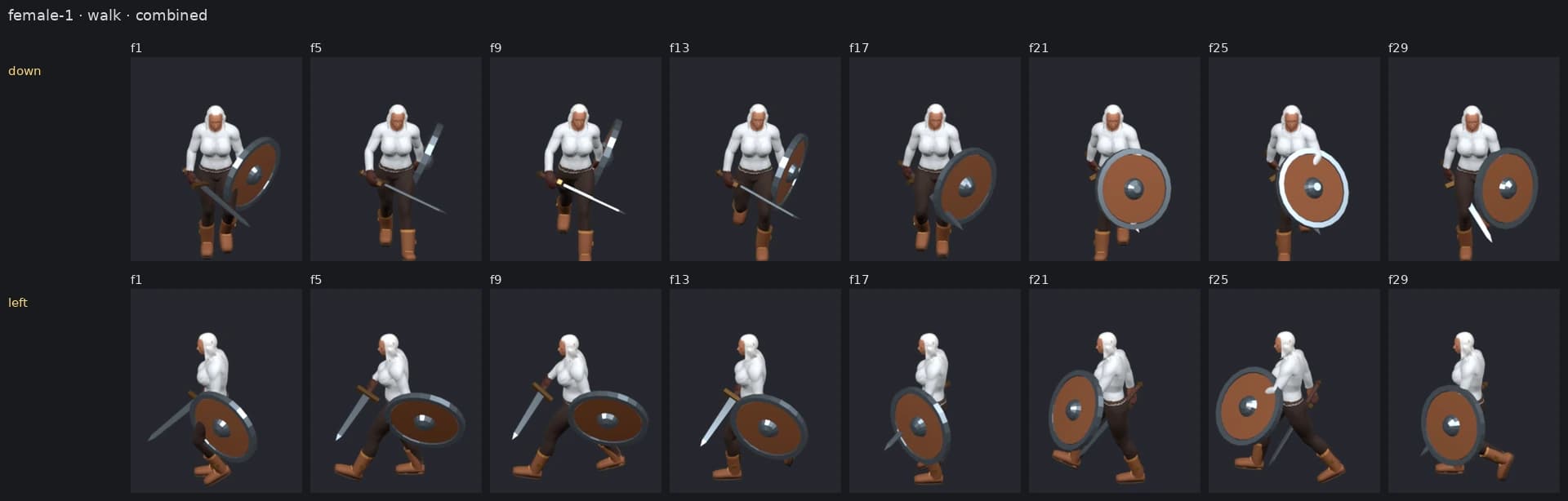
A shared capture contract keeps the camera, frame order, output cell, origin, and depth approach consistent across output.

Live
Browser Capture Tool
Blender-authored. Browser-rendered. Game-ready layered sprites.
A browser-based layered sprite production tool that turns canonical Blender-authored character, animation, and equipment packages into repeatable, game-ready capture output.
Product facts verified
What it does
DTWorldz Sprite Capture Studio is a layered sprite capture tool for canonical character, animation, and equipment packages prepared through the DTWorldz Blender Sprite Pipeline. Blender remains the authoring source; the browser Studio handles preview, capture configuration, and export.
The exported PNG atlases and JSON manifests are engine-agnostic. The workflow is not an AI-generated sprite tool, and it does not accept arbitrary .blend uploads: it consumes catalog-generated packages derived from canonical Blender master scenes.
This is not the 2D Ultimate Animator Unity product. Choose this browser Studio for Blender-canonical, reusable COLOR/DEPTH layers and portable manifests; choose 2D Ultimate Animator when the required outputs are Unity Sprite Libraries, Animator Controllers, resolver clips, and playable prefabs.
Simple workflow / 01—05
A short, repeatable capture path keeps character, direction, equipment, and output settings explicit before export.
01
Start from a catalog body package generated from the canonical Blender pipeline.
02
Choose the Action and the required 2, 4, or 8 direction set; left and right views render independently rather than being mirrored.
03
Build the equipment combination that should be previewed and captured with the selected body.
04
Check the 3D Scene and Pixel Output previews together with camera, frame, output cell, origin, and depth settings.
05
Export layered COLOR and DEPTH sprite atlases, PNG files, JSON manifests, and packaged ZIP or folder output.
Core features
The capture contract keeps directions, cells, origins, layers, and package output explicit across repeated exports.
A shared capture contract keeps the camera, frame order, output cell, origin, and depth approach consistent across output.
Left and right directions are rendered separately instead of mirroring one side into the other.
Preview and capture the reusable character body, equipped pieces, and assembled result as explicit layers.
Export reusable COLOR and DEPTH atlas output so downstream composition can preserve front and behind relationships.
Compose the body and equipment loadout you need before previewing or capturing an Action.
Produce PNG files, JSON manifests, quick Action ZIPs, or incremental batch-library folder output.
Run the capture Studio in a modern desktop browser without installing a separate desktop application.
Use a fixed output cell and consistent origin approach to keep captured frames predictable across layers.
Related workflow
The browser Studio is for Blender-authored packages. The Unity Editor asset is a separate workflow for capturing animated Unity prefabs.
Production note
Read why manifests, layer ownership, direction names and stable cell origins matter when a capture package must remain portable.
Read the field noteUnity alternative
Compare 2D Ultimate Animator when the character, equipment and animation clips already live in a Unity project.
Compare the Unity assetWho it is for
The Studio is designed for developers and technical artists who need consistent output across actions, directions, and equipment combinations.
Audience / 01
Audience / 02
Audience / 03
FAQ
The Studio complements Blender authoring and keeps its exported sprite data portable rather than tying it to one engine.
No. Blender remains the authoring source for canonical characters, animations, and equipment. The Studio consumes catalog-generated packages for browser preview, capture, and export; arbitrary .blend upload is not currently supported.
No. The Studio exports portable PNG atlases and JSON manifests and contains no Unity code, so the output is engine-agnostic.
The workflow covers body, equipment, and combined capture output, including reusable COLOR and DEPTH atlas layers with JSON manifests.
No. Left and right views are rendered independently so each direction keeps its own captured result.
No separate desktop application is required. The Studio runs in a modern desktop browser with JavaScript and WebGL.
This browser Studio consumes catalog-generated packages from the DTWorldz Blender pipeline and exports engine-agnostic COLOR/DEPTH PNG atlases with JSON manifests. 2D Ultimate Animator is a separate Unity editor product that starts from supported Mixamo-style FBX sources and generates Unity Sprite Libraries, Animator Controllers, resolver clips, and playable prefabs.
Ready to capture
Open the browser Studio to inspect a capture package, or read the documentation for the complete Blender-authored layered-sprite workflow.